
GroundPad
A mobile chauffeur communications app that connects drivers directly to your backoffice so dispatch, ride details, status updates, and passenger service stay in sync in real time.
GroundPad gives chauffeurs the reservation information, pickup details, directions, flight updates, instructions, and dispatch communication they need directly on their mobile device.
By creating a real-time two-way connection between dispatch and chauffeurs in the field, GroundPad helps reduce delays, improve driver accountability, minimize paper and voice communication, and give office teams stronger visibility into every active ride.
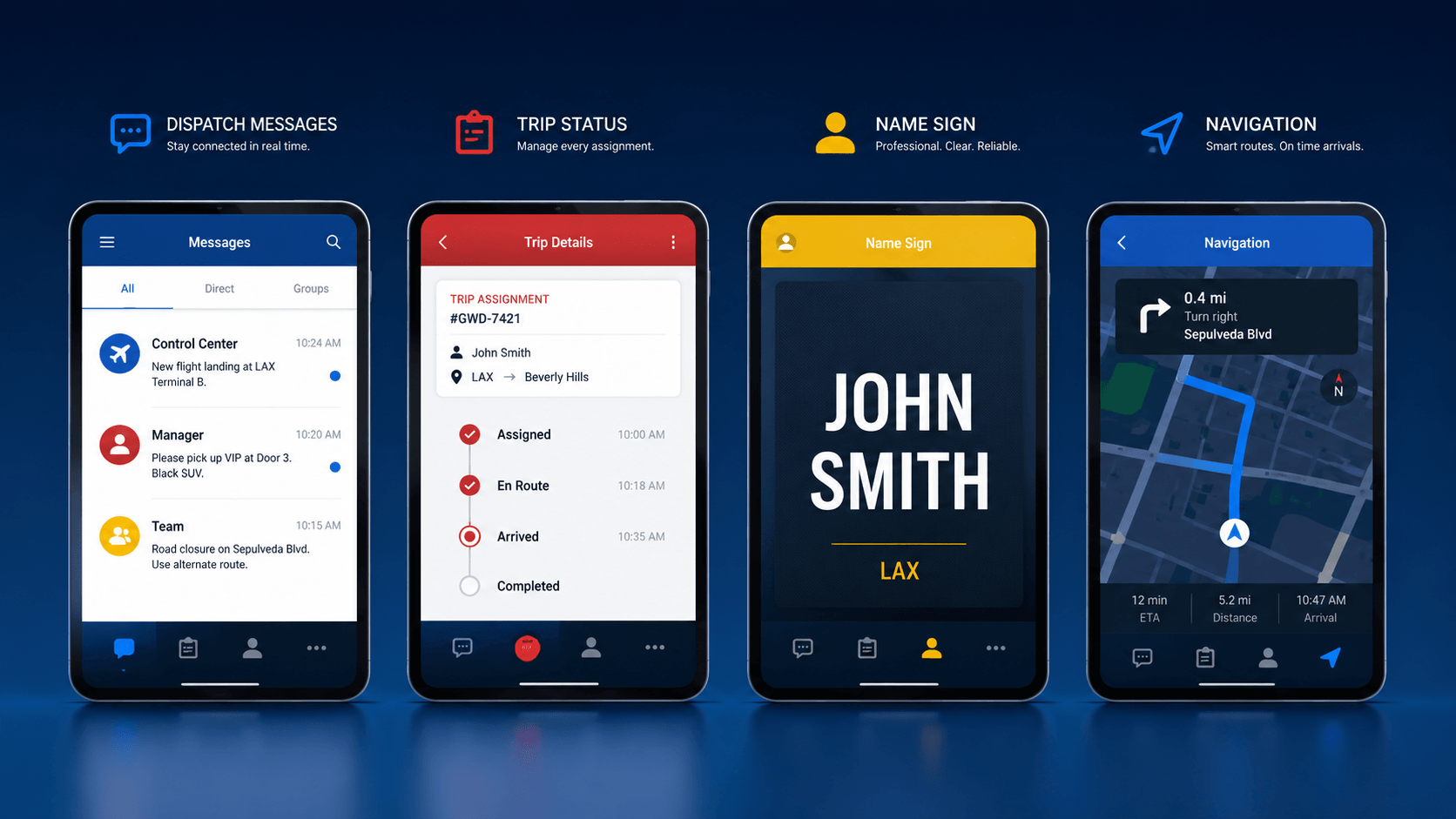
Dispatch communication, trip status, professional signage, and navigation in one chauffeur workflow.
Put the information chauffeurs need directly in their hands
GroundPad keeps the chauffeur connected to the trip, dispatch, and passenger experience from assignment through closeout.
Complete reservation information
Give chauffeurs direct access to stops, special instructions, service requests, and other trip-critical information.
Dispatch status and urgent messaging
Keep dispatch and chauffeurs connected with assignment alerts, required acknowledgements, and real-time status updates.
Navigation, flights, and professional signage
Support airport service and ride execution with flight status, mapping, turn-by-turn directions, and branded name signage.
A direct connection between your dispatch operation and chauffeurs in the field
Ground transportation companies need real-time status updates and chauffeur location data to respond quickly to customer calls, pickup changes, delays, and evolving trip conditions.
GroundPad integrates directly with the backoffice so dispatch and drivers can work from the same operational information instead of relying on disconnected calls, paper trip sheets, or manual status reporting.
Better communication helps the entire operation move faster
An integrated chauffeur communications app can reduce inbound calls, improve customer service handling, strengthen passenger visibility, and automate parts of trip closeout, billing, and payment workflows.
- Optimize dispatch and chauffeur communication
- Improve passenger visibility and service
- Reduce paperwork and paper trip sheets
- Support faster, more consistent trip closeout
Better outcomes for drivers, dispatch, passengers, and operations
GroundPad turns the chauffeur’s mobile device into a connected operational tool that keeps ride information, communication, and service activity moving in real time.
Give chauffeurs the details they need to perform
Drivers can review ride details, special instructions, stops, flight information, routes, and required alerts without depending on paper or repeated calls to dispatch.
Communicate faster with stronger acknowledgement
Dispatchers can send reservation assignments, fleet messages, urgent alerts, and instructions while requiring acknowledgement when important information needs driver attention.
Create a more professional pickup and ride experience
Branded airport signage, stronger chauffeur visibility, final-charge review, passenger acknowledgement, and instant receipts help support a more polished customer experience.
Reduce manual communication and paperwork
Status reporting, trip expenses, comments, signatures, and closeout information can move back into the operational system with less manual handling.
Build a more consistent chauffeur workflow from assignment through trip completion
GroundPad provides chauffeurs with the ride details necessary to perform at a high level. The workflow is designed to reduce avoidable errors by requiring drivers to acknowledge specific instructions, stops, and extra service requirements.
Chauffeurs can check flight status directly from their device, follow mapping and turn-by-turn directions, and use a customer-branded airport name sign for Meet & Greet service.
Keep dispatch and chauffeurs connected with real-time two-way communication
When reservations are sent to GroundPad, chauffeurs can receive visual or audio alerts. Dispatchers can send urgent messages that require acknowledgement, communicate with a single driver or the broader fleet, and receive status updates back into the backoffice.
Trip activity can include expenses, comments, final charges, passenger acknowledgement, and customer signatures, helping keep the office informed through the entire ride lifecycle.
What GroundPad helps chauffeurs and dispatch manage
Put complete trip details on the chauffeur’s device
Send reservation assignments, stops, special instructions, requests, and related ride details directly from the dispatch environment.
Support urgent communication and acknowledgement
Deliver fleet or individual messages, visual or audio alerts, and required acknowledgements for important reservation details.
Improve ride visibility throughout the trip
Support chauffeur ETA reporting, standard or customized dispatch statuses, location awareness, and final destination changes.
Support Meet & Greet with branded signage and flight data
Display customer-branded airport name signage and review flight updates within reservations or as a standalone tool.
Help chauffeurs navigate and manage field availability
Use mapping and turn-by-turn directions, book into zones or areas for queuing, and communicate idle time and status back to dispatch.
Move expenses, charges, signatures, and receipts into one workflow
Submit trip expenses, review final charges with passengers, capture acknowledgement, add comments, and email receipts after the ride.
A connected set of tools for the full ride lifecycle
GroundPad combines dispatch communication, ride execution, service visibility, and closeout tools into one chauffeur-facing workflow.
- Secure driver login and direct access to the dispatch system
- Instant alert on reservation assignment
- Required acknowledgement to accept reservation assignments
- View full reservation details, stops, special instructions, and special requests
- Review upcoming or previously completed trips
- View and respond to fleet messages or individual messages
- Use “Red-Alerts” for reservation details requiring acknowledgement
- Standard or customized dispatch status reporting
- Provide ETA to the pickup location
- Set final destination changes
- View reservation count broadcasts and vehicles in specific zones for Black Car workflows
- Book into a zone or area for queuing and notify dispatch of idle time and status
- Customer-branded airport name sign
- Check flight updates within reservations or as a standalone tool
- Mapping and turn-by-turn instructions within reservations or as a standalone tool
- Submit trip expenses such as parking, tolls, and waiting time
- Review final charges with passengers
- Capture passenger acknowledgement of final costs
- Send receipts to the passenger’s email address
- Submit comments related to the reservation
Replace paper and disconnected calls with a more professional mobile workflow
GroundPad leverages mobile and tablet technology to provide ground transportation companies with a comprehensive two-way chauffeur communication system. Chauffeurs receive the information they need wirelessly while dispatch and office teams gain stronger visibility into ride activity.
By minimizing paper and unnecessary voice communication, GroundPad helps create a more efficient workflow that allows office staff to stay focused on higher-value operational issues.
GroundPad deployment requirements
GroundPad supports common Apple and Android mobile devices and works with a supported server environment.
- Processor: Intel Xeon Processor E7-4850 v4 (Quad Core) 3.2 GHz or Higher
- Memory: 16 GB RAM
- Storage: 2 x 200GB or Higher, 15K RPM Drivers for Operating System in RAID 1 (SATA Not Recommended)
- Network: 2 x 1GB Network Adapters with 2 NIC Teaming Required
- Apple: iPhone or iPad
- Android: Smartphone or Tablet
See how GroundPad can improve chauffeur communication and ride execution
GroundPad connects chauffeurs and dispatch with real-time ride details, status updates, messaging, navigation, airport tools, and trip closeout workflows built for professional transportation operations.